
Overview
Write a TikTok script around one thing you can show on camera. Define the viewer’s problem, pick the shot that proves the result, and write one final action. Plan the opening around the footage you can actually capture, then read the lines while rehearsing the shots.
Decide who the video helps and what it proves
Picture one person with one problem. Give the clip a job that fits a short video, such as showing how to keep a charging cable from falling behind a desk. Choose a result the viewer can recognize in the frame.
Write down the product details you can verify and which action a viewer can take afterward. A short demonstration often needs a clear view of the setup and one shot that makes the outcome visible.
- Viewer
- Someone who keeps retrieving a dropped charging cable.
- Visible proof
- Show the same cable and desk edge before and after fitting a clip.
- Next action
- Invite the viewer to save the setup for the next desk tidy.
Build the hook around the first thing viewers see
TikTok’s Creative Codes describes a hook, body and close. Start with an image that makes the problem or result obvious. If the first shot shows a cable falling, the spoken line can name the annoyance while the footage shows it happening.
Then give the body one job. Show how the clip goes on and how the cable behaves afterward. Save the close for the action or takeaway that fits the proof you just showed.
Choose the frame that proves your claim
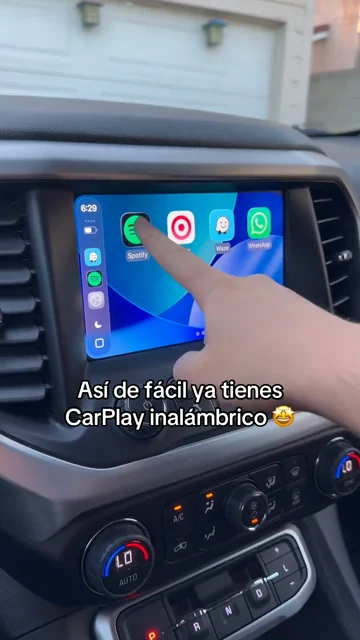
In the CarPlay walkthrough, the viewer sees the adapter and then the working dashboard. At about 16 seconds the app screen shows the connection in use. A shot of the adapter alone would leave viewers guessing whether it paired.
Borrow that progression for the cable-clip example. Start on the cable falling, show where the clip goes and hold the same desk edge in frame while the cable stays put. Write the spoken line after you decide what the viewer will see.
Fill in a script before you film
Write one sentence each for the viewer’s problem, what your footage will show, and what the viewer can do next. Leave time for the action. The cable-clip example uses 12 seconds to show someone unplug the cable and where it ends up.
Use the timing below as a rehearsal budget. Replace the bracketed instructions with footage you can capture, read your lines aloud and adjust the shot lengths after the first take.
Viewer and problem: [who is watching and what are they trying to fix?]
Visible proof: [what will the camera show?]
Next action: [what should the viewer do?]

0–4 s · Hook
Picture: […]
Spoken line: […]

4–12 s · Setup
Picture: […]
Spoken line: […]

12–24 s · Proof
Picture: […]
Spoken line: […]

24–30 s · Close
Picture: […]
Spoken line: […]
Read the script against the recorded shots
- Read the opening with the first shot. Check that the viewer can tell what the clip is about with the sound off.
- Film the proof shot at a useful distance and hold it until the result is clear. If the action takes longer than the script allows, shorten the line or extend the shot.
- Trim words the image already explains. Keep an on-screen label when it supplies a detail the viewer cannot identify from the picture.
- Check the last line and the text on screen. Give the viewer one action you can follow through on.
Use reference videos to guide what you film
Keep the original clip’s timestamps and quotes in your notes. Borrow a filming technique for your brief, such as showing a before and after from the same angle. Write dialogue for the footage you can film.
If you start with a script generator, read the proposed dialogue out loud and check every factual claim against the product and the shots you can capture. Leave the names of reference creators and exact quotes in the research notes for verification.
Draft the words and pictures together
Use the fictional example below as a rehearsal plan. The ranges budget 30 seconds. Adjust them after reading the lines aloud and filming the action. Leave time for viewers to see the result before the next cut.
| Time | Picture | Spoken line |
|---|---|---|
| 0–4 s | Let the cable slip off the edge. | There goes my charger again. |
| 4–12 s | Mount the clip and feed the cable through. | I’m putting a clip where I actually reach for it. |
| 12–24 s | Unplug the cable and keep the desk edge in view. | Now I can unplug it and the end stays right here. |
| 24–30 s | Show the finished setup. | Save this for your next desk tidy. |
Sources and verification
The cable-clip script is a fictional rehearsal plan. The original CarPlay walkthrough shows a visible result after setup. TikTok Creative Codes and Adobe’s shot-list guide provide published references for planning the order of the story and the shots.