
TikTok transcript examples with timestamps
Updated
Choose a file for your next step
- TXT
- Save the words as plain text for reading or quoting. Use the Timestamps switch to see where each line starts in the preview.
- SRT
- Try importing subtitles with start and end timestamps into a video editor that accepts SRT.
- VTT
- Try a WebVTT subtitle file in a compatible web player. It includes a start and end timestamp for each line.
Compare the same four lines
Sample transcript
1
00:00:01,200 --> 00:00:04,400
Pick one video you want to save.

2
00:00:04,600 --> 00:00:08,100
Copy the link and keep it with your notes.

3
00:00:08,600 --> 00:00:12,300
Write down the line you want to revisit.

4
00:00:12,700 --> 00:00:16,800
Add a timestamp so you can find it again.
Sample data · Exports are generated in your browser.
Switch between SRT and VTT and compare the first line. Its start timestamp is 1.200 seconds and its end timestamp is 4.400 seconds in both formats.
Use a time range to revisit a real shot
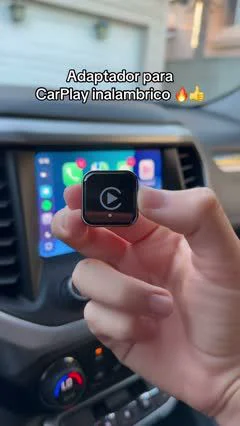
In the CarPlay walkthrough, the creator moves from holding up the adapter to pairing the phone. The storyboard gives this setup its own range.
00:05–00:14The adapter connects to the console and pairs with the phone.
Use that range to find the whole setup again. For subtitles, time each line to the audio inside the shot.